Extended gaming sessions demand precision, comfort, and endurance not only from the player but also from the equipment. Among all peripherals, the gaming mouse plays a critical role in both performance and long-term physical well-being. Poor ergonomics can lead to fatigue, discomfort, and even long-term injuries such as carpal tunnel syndrome or tendon strain. A well-designed gaming mouse, however, can maintain efficiency while significantly reducing the physical stress placed on the hand, wrist, and forearm.
This article explores the essential ergonomic principles behind gaming mice, how they influence long-session comfort, and how to choose the right device for your needs.
1. Why Mouse Ergonomics Matter
Using a mouse is a repetitive micro-movement activity. During intense gaming, these movements become more rapid, precise, and frequent. When the hand and wrist remain in unnatural or tense positions for long periods, problems such as wrist pain, finger fatigue, forearm tightness, and nerve compression can arise.
An ergonomic gaming mouse helps distribute pressure evenly, encourages natural hand alignment, and minimizes strain on muscles and tendons. This can enhance reaction times, prevent fatigue, and support overall performance during long gaming marathons.
2. Hand Position and Grip Styles
Different players use different grip styles, and choosing a mouse designed for your natural posture is crucial for comfort:
• Palm Grip
The hand rests fully on the mouse, offering maximum support and reduced finger strain. A good ergonomic mouse for palm grip players typically has:
- A larger, curved body
- High rear arch to support the palm
- Smooth, gradual side contours
• Claw Grip
The palm contacts the back of the mouse while the fingers arch sharply over the buttons. Ergonomic features for claw grip include:
- Narrower mid-section
- Defined, higher back end
- Easy-to-click buttons requiring minimal force
• Fingertip Grip
Only the fingertips touch the mouse. This grip is agile but offers less support, requiring:
- Lightweight design
- Low-profile mouse body
- Responsive switches with short travel
Understanding your grip style is the foundation for selecting a comfortable gaming mouse.
3. Shape and Sculpting
The physical shape influences natural hand positioning. Key ergonomic design elements include:
- Contoured body: Supports natural finger and palm curves.
- Thumb rest or groove: Reduces gripping tension by offering a stable resting surface.
- Asymmetrical design: Most ergonomic mice favor right-handed users, providing better thumb and palm support compared to symmetrical “ambidextrous” shapes.
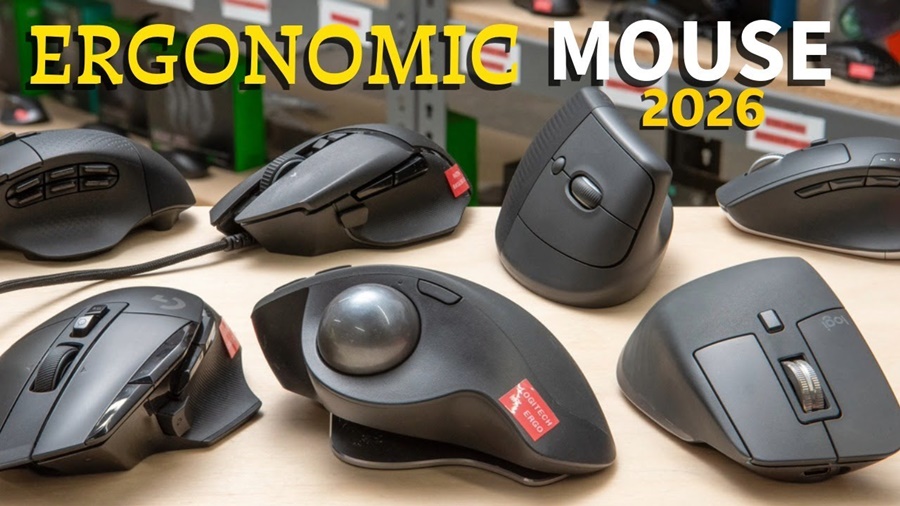
- Tilted or angled shapes: Help maintain a more neutral wrist position, reducing ulnar deviation (side bending of the wrist).
A mouse that fits the hand’s natural structure minimizes muscular effort and maintains accuracy without strain.
4. Size and Weight Considerations
Size and weight dramatically impact comfort during extended gaming:
Mouse Size
A mouse that is too large forces the hand to stretch, while one that is too small causes unnecessary gripping pressure. Ideal sizing allows:
- Full palm support
- Natural finger curvature
- Relaxed hand posture
Mouse Weight
Heavy mice may stabilize movements but can fatigue the wrist during fast-paced games. Lightweight models (under 70 g) reduce energy expenditure and are increasingly popular for long esports sessions. Some high-end mice allow weight customization, enabling players to tailor resistance and control.
5. Switches, Buttons, and Actuation Force
Ergonomic comfort extends beyond the body shape to the mechanical components:
- Light actuation force: Reduces finger fatigue over thousands of clicks.
- Well-positioned side buttons: Prevent awkward reaching or thumb strain.
- Textured button surfaces: Assist with grip stability without pressing harder than necessary.
A responsive, low-resistance click improves precision and reduces cumulative stress on finger joints.
6. Surface Materials and Grip
The exterior material affects long-term comfort:
- Soft-touch coatings offer a smoother feel but may wear faster.
- Matte textures provide grip without causing friction burns.
- Rubberized side panels increase lateral stability and reduce squeezing force.
Breathable or textured surfaces help prevent sweat buildup, which can lead to inconsistent grip or hand tension.
7. Sensor Performance and Sensitivity
While sensor accuracy is often seen as a performance factor, it also affects ergonomics. A precise sensor reduces the need to overcompensate with exaggerated hand movements, minimizing wrist strain. Adjustable DPI allows players to find a sensitivity level that suits their natural range of motion.
8. Cable and Wireless Considerations
Cable drag can subtly increase resistance, causing players to grip harder or flick more forcefully. This becomes noticeable during long sessions. Options to improve ergonomics include:
- Paracord-style ultralight cables
- Mouse bungees to hold cables in place
- Wireless designs, which now offer latency equal to wired models
Reducing physical resistance directly reduces user fatigue.
9. Preventing Strain During Long Sessions
Even with the best mouse, good habits are essential:
- Take short breaks every 45–60 minutes.
- Maintain a neutral wrist position, with forearm level to the desk.
- Use a supportive mousepad with consistent glide and adequate space.
- Keep shoulders relaxed to avoid transferring tension down the arm.
Ergonomics is a combination of equipment and behavior.
10. Choosing the Right Mouse for You
A well-chosen gaming mouse should match your:
- Hand size
- Grip style
- Gameplay type (FPS, MMO, strategy)
- Preference for weight and materials
Testing different models or at least comparing dimensions and reviews helps ensure the mouse supports your natural hand posture.
Conclusion
The ergonomics of a gaming mouse play a crucial role in comfort, durability, and overall gaming performance. Long gaming sessions put strain on the hand and wrist, but a properly designed mouse reduces tension, improves precision, and supports long-term joint health. By considering shape, grip, size, weight, and switch mechanics, gamers can significantly enhance both their comfort and competitive edge.
If you’d like, I can also create:
- A shorter summary version
- A version optimized for SEO
- A version formatted for a blog post or magazine
- A version targeted at beginners or professionals