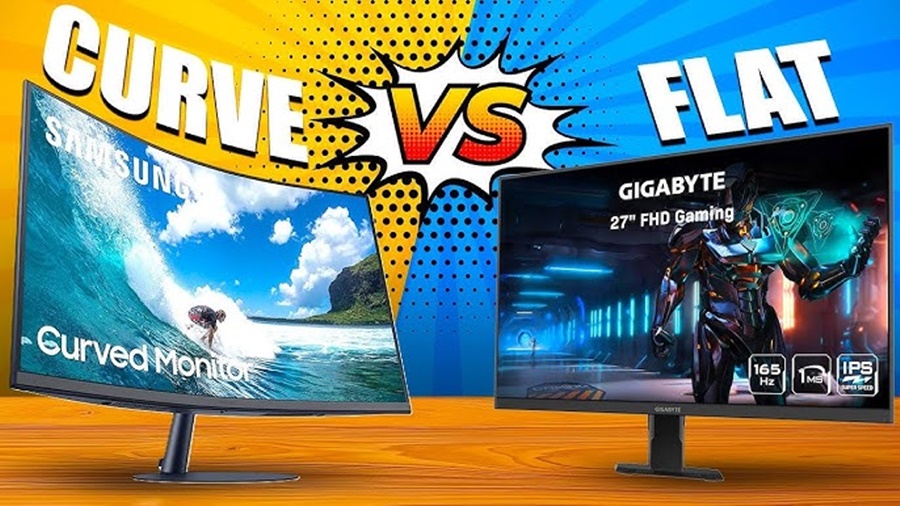
Choosing the right gaming monitor can dramatically impact your gaming experience. Two popular options curved and flat monitors each offer unique benefits and drawbacks. This guide breaks down everything you need to know to make an informed choice based on performance, immersion, comfort, and value for money.
Introduction: Why Monitor Choice Matters for Gaming
A gaming monitor is more than just a screen it’s your window into virtual worlds. With advancements in display technology, gamers now have multiple options to elevate graphics, responsiveness, and immersion. Curved and flat monitors differ primarily in design, but this difference can influence gameplay comfort and performance.
By understanding the pros and cons of each type, you’ll be better equipped to pick a monitor that suits your gaming style and needs.
1. What Is a Curved Gaming Monitor?
A curved gaming monitor features a screen that arcs inward, designed to wrap around your field of view. This curvature aims to mirror the natural shape of your eyes, reducing strain and enhancing immersion.
Typical Curvature Ratings:
- 1000R: Very curved, more immersive (great for close viewing)
- 1500R: Moderate curve
- 1800R: Slight curve, less intense than more curved models
The lower the “R” number, the more pronounced the curve.
2. What Is a Flat Gaming Monitor?
A flat gaming monitor is the traditional display with a completely flat screen. It’s the most common type of monitor across all computing needs from work and browsing to competitive gaming.
Flat screens are versatile, predictable, and compatible with multi-monitor setups.
3. Immersion & Visual Experience
Curved Monitor:
Wraps around your vision
Creates a panoramic feel
Heightens immersion in story-driven and open-world games
The curvature makes your view feel wider and more natural, especially in games where peripheral awareness matters.
Flat Monitor:
Consistent visuals across the screen
No geometric distortion
Great for competitive and fast-paced games
Flat displays offer a more traditional gaming feel without curve-induced visual changes.
Winner for immersion: Curved, especially on larger screens (27″ and above).
4. Comfort & Eye Strain
Curved Monitors:
Reduce eye movement for peripheral vision
Can feel more comfortable during long gaming sessions
Curved monitors can place all parts of the screen at a more equal distance from your eyes.
Flat Monitors:
Familiar viewing experience
May cause eye strain on ultra-wide formats (if you have to turn your head)
Winner for comfort: Curved, but only if you sit close and centered.
5. Performance & Competitive Gaming
For gamers focused on reactions and frame-rate performance:
Flat Monitors:
Typically more popular in esports
Offer consistent performance
Easier for tracking fast-moving visuals
Curvature doesn’t improve response time or refresh rate, so flat screens remain the standard in competitive arenas.
Winner for competitive gameplay: Flat
6. Size & Resolution Considerations
Curved Monitors:
Best for ultra-wide screens (34″ and up)
21:9 or wider aspect ratios enhance immersion
Works best when sitting in one spot
Curved designs shine at larger sizes where a flat display feels too wide.
Flat Monitors:
Flexible for all sizes
Easier to pair with multi-monitor setups
Suits 16:9 and widescreen formats alike
Sizing tip: If you plan to game, work, and multitask, flat monitors are more adaptable.
7. Cost & Value for Money
Curved monitors, especially ultra-wide high-performance displays, tend to cost more than flat counterparts with similar specs.
Curved Screens:
Premium pricing
Often include advanced features (higher refresh rates, better color)
Flat Screens:
More budget-friendly options
Broad range of sizes and performance levels
Winner for cost-effectiveness: Flat
8. Multi-Monitor Setups
Curved Monitors:
Not ideal for multi-monitor configurations
Curve makes aligning multiple screens difficult
Flat Monitors:
Perfect for dual or triple-monitor setups
Consistent edges for bezel-less alignment
Winner for multi-monitor use: Flat
9. Gaming Genres & Use Cases
- Immersive RPGs, simulators, open-world games → Curved
- Competitive shooters, MOBAs, fast-paced titles → Flat
- Work and productivity → Flat
- Casual gaming + movies → Curved
Your best choice often depends on what games you play most.
Conclusion
Choosing between a curved and a flat gaming monitor ultimately comes down to how you play, what you play, and how you use your setup. Curved monitors excel at immersion, making them a great choice for gamers who enjoy open-world adventures, racing games, flight simulators, and cinematic experiences especially on larger or ultrawide screens. They can also offer improved comfort during long gaming sessions when positioned correctly.
Flat monitors, on the other hand, remain the most practical and versatile option. They are ideal for competitive and esports-focused gamers who prioritize precision, consistency, and fast reaction times. Flat displays are also better suited for multi-monitor setups, general productivity, and budget-conscious buyers.
In the end, neither option is universally “better.” A curved monitor enhances immersion and visual engagement, while a flat monitor delivers flexibility and performance reliability. By considering your gaming preferences, desk space, and budget, you can confidently choose the monitor that best complements your gaming experience.