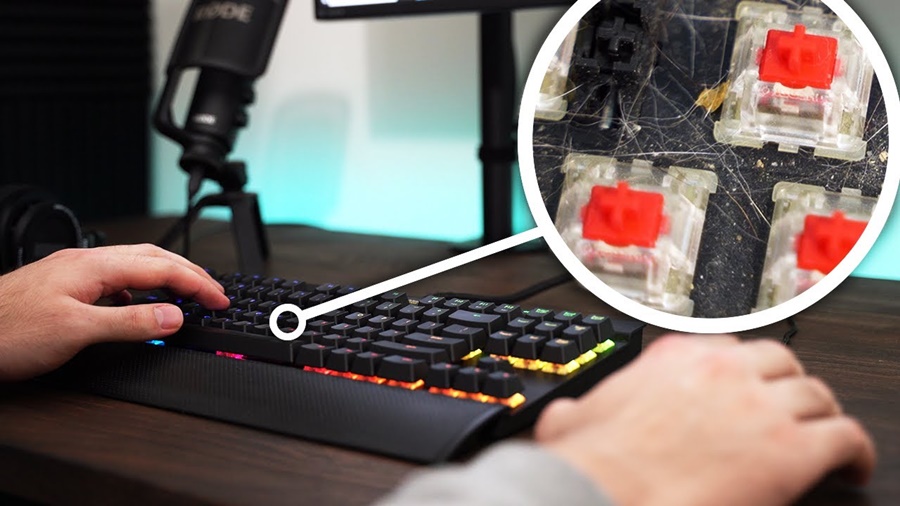
A gaming keyboard is more than just a tool it’s a vital part of your gaming setup. Over time, however, dust, crumbs, and sweat can build up between the keys, affecting performance and hygiene. Regular maintenance and proper cleaning can keep your keyboard looking new and functioning smoothly for years.
In this guide, we’ll walk you through everything you need to know about maintaining and cleaning your gaming keyboard, from basic care to deep cleaning.
1. Why Cleaning Your Gaming Keyboard Is Important
Cleaning your keyboard regularly isn’t just about appearances. Here are some key reasons why it matters:
- Improved Performance: Dust and debris can interfere with key switches, causing unresponsive or sticky keys.
- Hygiene: Keyboards can harbor bacteria and germs especially if you snack while gaming.
- Longevity: Regular cleaning helps prevent long-term damage to switches and circuits.
- Aesthetic Appeal: A clean keyboard enhances your gaming setup and feels more satisfying to use.
2. What You’ll Need
Before you start cleaning, gather these essential tools:
- A soft brush or compressed air can
- Microfiber cloth
- Isopropyl alcohol (70% or higher)
- Cotton swabs
- Keycap puller (for mechanical keyboards)
- Small bowl (for soaking keycaps)
- Mild soap and warm water
3. Step-by-Step: How to Clean Your Gaming Keyboard
Step 1: Unplug the Keyboard
Always disconnect your keyboard from your PC or turn it off if it’s wireless. This prevents accidental key presses and ensures safety during cleaning.
Step 2: Remove Loose Debris
Flip your keyboard upside down and gently shake it to dislodge crumbs and dust. Use a soft brush or a can of compressed air to blow out debris between the keys.
Pro tip: Do this regularly, even if you’re not doing a full cleaning session.
Step 3: Wipe the Surface
Use a microfiber cloth lightly dampened with isopropyl alcohol to wipe the surface and key tops. This removes oil, sweat, and dirt buildup. Avoid soaking the cloth moisture can damage electronic components.
Step 4: Deep Cleaning (For Mechanical Keyboards)
If your keyboard is particularly dirty or sticky, it’s time for a deep clean.
- Remove Keycaps: Use a keycap puller to gently lift off each keycap.
- Soak Keycaps: Place them in a bowl of warm water mixed with mild soap. Let them soak for about 30 minutes.
- Clean the Base: While keycaps are soaking, use compressed air or a soft brush to clean between the switches.
- Disinfect: Dip a cotton swab in isopropyl alcohol and carefully clean around each switch.
- Dry Everything: Allow keycaps to dry completely before reattaching them.
Step 5: Reassemble the Keyboard
Once all parts are dry, reattach the keycaps according to your keyboard’s layout. Plug the keyboard back in and test all keys to ensure proper functionality.
4. Additional Maintenance Tips
- Avoid eating near your keyboard – crumbs are the biggest culprits of grime buildup.
- Wash your hands before gaming – less oil means a cleaner keyboard.
- Use a dust cover when your keyboard is not in use.
- Clean monthly for light maintenance and every 3–6 months for deep cleaning.
- Be gentle with RGB lighting zones – avoid harsh chemicals that could damage LEDs or coatings.
5. When to Replace Your Keyboard
Even with regular cleaning, keyboards have a lifespan. If you notice unresponsive keys, fading backlighting, or persistent mechanical issues, it may be time to upgrade. Maintaining your current keyboard ensures it lasts as long as possible—but it won’t last forever.
Conclusion
A clean gaming keyboard isn’t just about look it enhances performance, comfort, and longevity. By following a regular maintenance routine and using the right tools, you can keep your gaming gear in top shape for years of smooth, precise gameplay.
Whether you’re a casual gamer or a pro, remember: a clean keyboard is a happy keyboard.