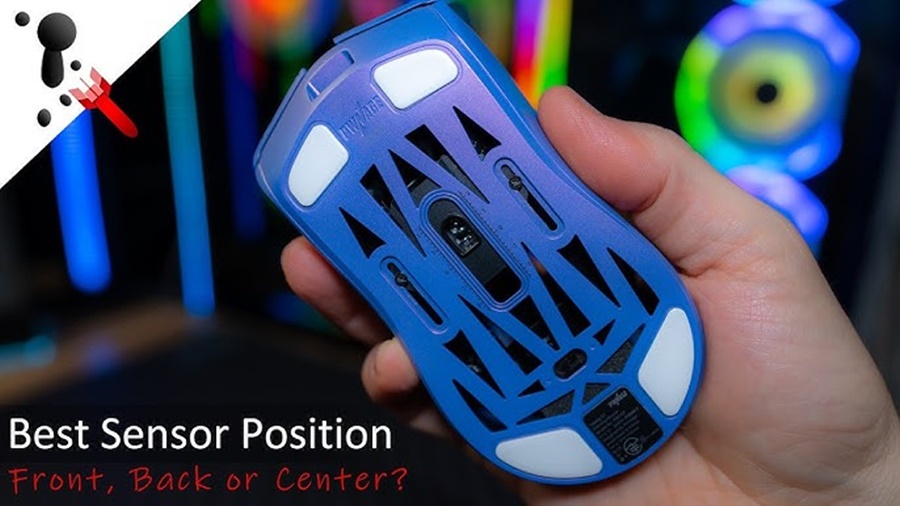
Gaming mouse sensors are the core components that translate your physical hand movements into on-screen cursor actions. Understanding how different sensors work helps you choose the right mouse for your play style whether you prefer pinpoint precision for FPS games or fast tracking for MOBAs.
Below is a clear breakdown of the main types of gaming mouse sensors and how they differ.
1. Optical Sensors
Optical sensors use an LED (usually infrared) to illuminate the surface beneath the mouse. A tiny camera then takes thousands of pictures per second to track movement.
How They Work
- LED lights the surface.
- Sensor analyses light reflections and surface texture.
- Tracks movement through image comparison.
Pros
- Highly accurate tracking on most surfaces
- Low latency—preferred for competitive FPS
- More consistent compared to laser sensors
- No acceleration issues in modern high-end optical sensors
Cons
- Doesn’t track well on very glossy or glass surfaces
- Requires a decent mousepad for best performance
Best For:
FPS gamers, esports players, general gaming.
2. Laser Sensors
Laser sensors work similarly to optical ones but use a laser instead of an LED. This allows deeper surface penetration and tracking on more types of surfaces.
How They Work
- Laser illuminates surface with greater precision
- Captures microscopic details, even on glass
Pros
- Works on almost any surface, including glass
- Highly sensitive at very high DPI levels
Cons
- Can introduce mouse acceleration, making movement less predictable
- Overly sensitive may pick up unwanted micro-movements
- Less preferred for competitive gaming
Best For:
General users, productivity setups, casual gamers.
3. Hybrid (Optical-Laser) Sensors
These combine optical imaging with laser enhancement to work on a wider range of surfaces while reducing acceleration issues.
Pros
- Better surface compatibility
- Improved tracking stability vs. pure laser sensors
Cons
- Still not as consistent as high-end optical sensors
- Rare in modern gaming mice due to improved optical technology
Best For:
Those needing versatility across multiple surfaces.
4. Mechanical Tracking Sensors (Old/Retro)
Before optical technology, mice used mechanical tracking rubber balls and rollers.
Pros
- Works without special surfaces
- Nostalgic, simple build
Cons
- Bad accuracy
- Frequent cleaning required
- Obsolete for modern gaming
Best For:
Retro tech purposes only not gaming.
5. Modern High-Performance Sensors (Hero, Focus+, PAW3395, etc.)
Today’s top gaming sensors are advanced optical sensors created for esports-level performance.
These include:
- Logitech HERO 25K
- Razer Focus+
- PixArt PAW3395 / 3370 / 3389
Features
- Extremely high DPI (20,000–40,000+)
- 0 acceleration
- Low power consumption (great for wireless gaming)
- High IPS (speed tracking) vital for fast flicks
- Ultra-low lift-off distance
Best For:
Competitive players who demand the best precision and speed.
6. Gyroscopic / Motion Sensors (Emerging Technology)
Some modern mice use built-in gyros to improve stability or allow air-mouse functionality.
Pros
- Enhanced motion detection
- Useful for VR, AR, and 3D applications
Cons
- Not yet widely used in traditional gaming
- Still experimental for competitive play
Conclusion
Gaming mouse sensors play a crucial role in determining accuracy, responsiveness, and overall performance. While laser sensors offer broad surface compatibility, they can introduce unwanted acceleration. Hybrid sensors aim to balance precision and versatility but remain less reliable than high-end options. In contrast, modern optical sensors especially advanced models like the HERO, Focus+, and PixArt series deliver the most consistent, accurate, and low-latency tracking available today, making them the preferred choice for competitive and casual gamers alike. Ultimately, selecting the right sensor depends on your needs, but for most players seeking precision and reliability, a high-quality optical sensor stands out as the best option.