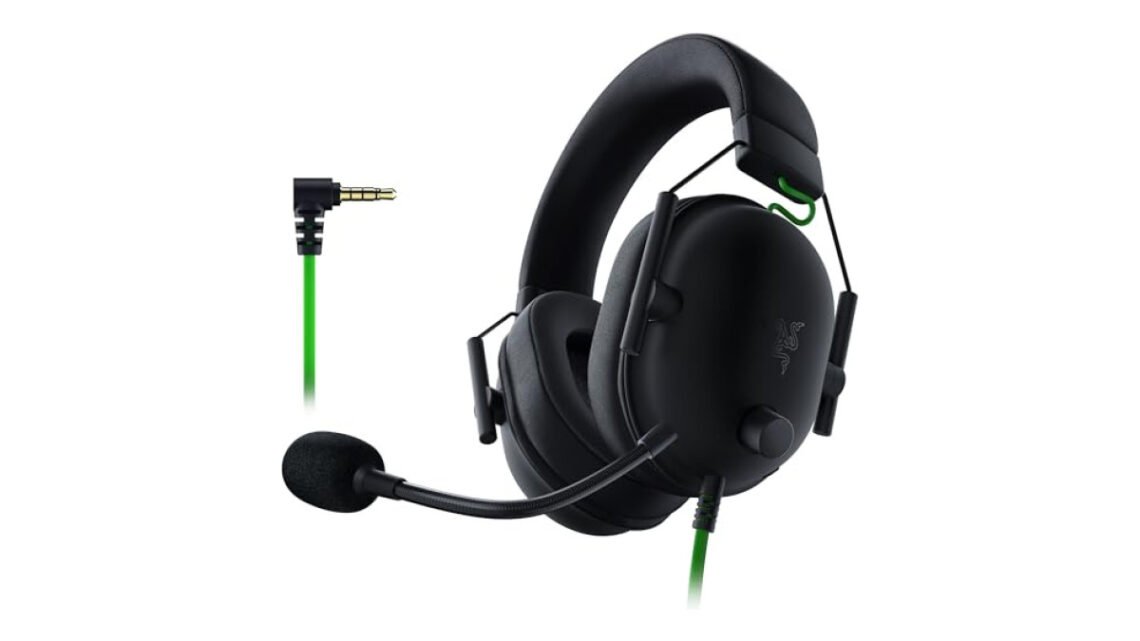
The Razer BlackShark V2 stands out as a strong headset tailored for gamers and streamers. Its THX Spatial Audio takes in-game sound to new levels, while its comfortable design supports long hours of gameplay without causing strain.

Razer BlackShark V2 X Gaming
Best for: Great for gamers and streamers
- Excellent sound isolation quality
- Comfortable for long gaming sessions
- Great compatibility across devices
- Surround sound only on Windows
- Mic can be overly sensitive
The standout feature of the BlackShark V2 is its exceptional noise cancellation, which makes it easy to immerse yourself in gaming without distractions. However, it’s worth noting that while the sound isolation is superb, the headset may not be the best option for those who need to be aware of their surroundings, such as in a shared space.
If you’re purely focused on gaming and want to block out external noise, this headset meets that need perfectly.
| Best for | Gamers and streamers seeking great sound and comfort |
| Not ideal for | Those needing to stay aware of ambient sounds |
| Standout feature | THX Spatial Audio for immersive sound |
| Value | Mid-range |
| Bottom line | A great choice if audio precision and comfort are your top priorities. |
Things I like
- Excellent THX Spatial Audio for immersive gaming.
- Comfortable design for extended wear.
- Good compatibility with multiple devices.
Things I’d improve
- The mic could have better voice clarity for streaming.
- Price point might be higher for some users.
- Controlling the settings via software can be unintuitive.
Overview
| Brand | Razer |
| Type | Gaming Headset |
| Finish/Color | Black/Green |
| Material | Plastic, Memory Foam |
| Warranty | 2 Years |
| Mounting/Format | Over-ear |
The Razer BlackShark V2 fits well within the gaming headset category, aiming for those who prioritize audio precision and comfort. It competes with other mid-range options but stands out with its spatial audio capability and overall comfort, catering specifically to long gaming sessions.
Design & Build
| Weight | 262 grams |
| Ear Cups | Memory foam |
| Headband | Adjustable with soft padding |
The design of the BlackShark V2 is both sleek and functional. The headset features a lightweight build of around 262 grams, which is comfortable for long sessions. The memory foam ear cups fit snugly, providing solid passive noise isolation while remaining soft against your ears. The headband is adjustable, allowing for a personalized fit that adds to its usability over extended periods.
These elements matter because comfort can make or break your gaming sessions, especially during those long play hours where fatigue can set in.
The overall aesthetics are subtle yet visually appealing, reinforcing Razer’s brand identity without being overly flashy. If you’re someone who prefers a more understated style, this headset might appeal to you as well.
Performance
In terms of performance, the BlackShark V2 really shines. It boasts THX Spatial Audio, allowing sound to seem like it’s coming from all around you, which is essential for an immersive gaming experience. This feature is particularly beneficial for competitive gamers who need precise audio feedback, such as footsteps or environmental sounds.
It works well across various gaming genres, enhancing both action and strategy games by allowing you to pinpoint sound locations more accurately.
| Audio Drivers | 50 mm |
| Frequency Response | 12 Hz – 28 kHz |
| Impedance | 32 ohms |
The headset features large 50 mm audio drivers that produce clear sound with a deep bass response, making gunfire, explosions, and subtle audio cues all stand out. The frequency response range of 12 Hz to 28 kHz enhances this ability even more by providing a wide sound spectrum. However, the clarity of the microphone could be better for those involved in online gaming or streaming.
The voice quality doesn’t match the excellent audio performance, so if you plan on talking while gaming, consider whether this meets your needs.
How It Handles Everyday Situations
- In a noisy environment, the noise cancellation isolates you from distractions, enhancing focus.
- For long gaming marathons, the memory foam ear cushions reduce fatigue.
- During multiplayer sessions, the audio clarity helps in coordinating strategies with teammates.
- At home, connectivity with different devices (PC, console, mobile) offers versatility without needing multiple headsets.
Ease of Use & Installation
Setting up the BlackShark V2 is straightforward. Just plug it into your device, whether it’s a console or a PC, and you’re ready to go. The headset doesn’t require extensive setup or software downloads, however, to access some features, Razer’s Synapse software can be helpful. The learning curve is low if you are familiar with standard gaming headsets, as most controls are intuitive.
In the Box:
- Razer BlackShark V2 headset
- Audio cable
- USB sound card
- User manual
How It Compares
| Option | Best for | Key difference |
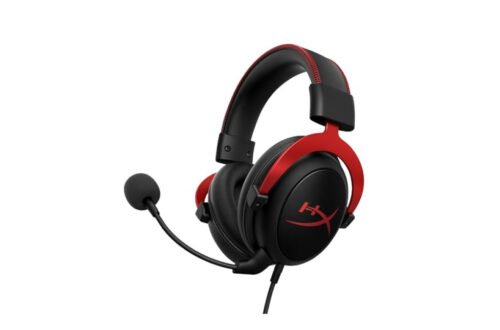
| HyperX Cloud II | General use and comfort | Better microphone quality |
| Logitech G Pro X | Professional gamers | Customizable sound profiles |
The BlackShark V2 stands out in comparison due to its spatial audio technology, which isn’t always a given in its competitors. While options like the HyperX Cloud II deliver better microphone clarity, the immersive sound experience of the BlackShark V2 is hard to match in this price range. It serves well in enhancing gameplay, especially in competitive settings.
Who Should Buy This
Great fit
- Gamers wanting clear and immersive audio.
- Streamers who prioritize comfort during long sessions.
- Those who appreciate good noise isolation.
Look elsewhere if
- You need a high-quality microphone for streaming.
- You frequently switch between gaming and casual use.
- You require a headset that allows ambient sound awareness.
Final Verdict
For those prioritizing sound quality, the Razer BlackShark V2 is a top choice due to its effective audio enhancement features. Gamers needing superior microphone clarity may want to explore alternatives like the HyperX Cloud II, which targets better vocal performance.
Razer BlackShark V2 X Gaming
Best for: Great for gamers and streamers
- Excellent sound isolation quality
- Comfortable for long gaming sessions
- Great compatibility across devices
- Surround sound only on Windows
- Mic can be overly sensitive
Our write-up on prefer a lightweight gaming picks up where this leaves off.
Frequently Asked Questions
What are the features of the Razer BlackShark V2?
The Razer BlackShark V2 features custom-tuned 50mm drivers for enhanced audio, a detachable Razer HyperClear cardioid microphone for clear communication, and advanced passive noise isolation for an immersive gaming experience. It also comes with customizable RGB lighting and comfort-driven ear cushions for extended use.
How does the Razer BlackShark V2 compare to other Razer headsets?
The Razer BlackShark V2 stands out for its combination of sound quality and comfort, making it a top choice among Razer headsets. Compared to others, it offers better noise isolation and a specialized design for competitive gaming.
Is the Razer BlackShark V2 comfortable for long sessions?
Yes, the Razer BlackShark V2 is designed with comfort in mind, featuring plush memory foam ear cushions and a lightweight build. This makes it suitable for extended gaming sessions without experiencing discomfort.
Can you use the Razer BlackShark V2 on consoles?
Yes, the Razer BlackShark V2 is compatible with consoles, making it a versatile choice for gamers who play on various platforms. It connects easily through a 3.5mm audio jack, allowing for quick setup.
Why choose Razer BlackShark V2 for gaming?
Choosing the Razer BlackShark V2 for gaming is beneficial due to its exceptional audio quality, clear microphone for communication, and comfortable fit for long gaming sessions. These features enhance the overall gaming experience, making it a favorite among players.