I went into this roundup the way I normally do when I am trying to pick a keyboard for my own desk: I compared the stuff that actually changes daily use, not just the marketing words. I looked at layout, switch type, hot-swap support, connection options, battery size where applicable, desk footprint, extras like knobs or shortcut keys, and whether each board feels more like a budget buy, a practical mid-range pick, or something closer to a premium enthusiast option. If you are hunting for the best hot-swappable keyboard, these are the three that stood out most from the current listings I verified.
Hot-swappable keyboards are great because they let you change switches without soldering. That means you can start with one feel, then later swap to something quieter, softer, faster, or more tactile without replacing the whole board. For gamers, that means easier customization. For work, that means you can tune the typing feel until it actually suits your hands.
Quick Buying Guide: What Should You Ask Before Choosing?
Before you pick one, ask yourself a few simple questions.
- Do you want a full-size keyboard with a numpad, or do you want something smaller that saves desk space?
- Do you need wireless, or are you perfectly happy with wired if it means lower cost and less charging?
- Do you prefer a smoother linear feel, a tactile bump, or a louder clicky switch?
- Are you buying mainly for gaming, office work, or a mix of both?
- Do you care about sound right out of the box, or are you fine tweaking switches and keycaps later?
- Do you want extra features like a knob, media controls, or multiple device pairing?
Those answers matter more than brand names, because the best hot-swappable keyboard is usually the one that fits your setup and habits, not the one with the flashiest spec sheet.
Types of Hot-Swappable Keyboards
| Type | What it is | Best for | Trade-off |
|---|---|---|---|
| Full-size wired | Full layout with numpad and function row | Workstations, spreadsheets, gaming desks | Takes more desk space |
| Compact 75% | Smaller layout, keeps arrows and key essentials | Mixed work and gaming | No full numpad |
| 95% / 98-key wireless | Nearly full-size, more compact footprint | Productivity users who still want more keys | Usually costs more |
| Budget hot-swap board | Basic but customizable keyboard | First custom keyboard buyers | Fewer premium materials |
| Tri-mode wireless board | Wired, 2.4GHz, and Bluetooth in one | Multi-device users | Battery management matters |
Our Top Picks by Category
| Category | Product | Why it stands out |
|---|---|---|
| Best budget full-size pick | Redragon K668 RGB Gaming Keyboard | Full-size layout, hot-swap support, extra shortcut keys, solid value |
| Best compact all-rounder | AULA F75 Pro Wireless Mechanical Keyboard | 75% layout, tri-mode wireless, knob, 4000mAh battery |
| Best premium-style feature pick | wegear PIXIU 98 Mechanical Gaming Keyboard | CHERRY MX2A switches, 95-key layout, tri-mode wireless, fast polling, gasket design |
Detailed Hands-On Reviews
Redragon K668 RGB Gaming Keyboard
Tested by: Editorial feature review
Best for: Budget buyers who want a full-size hot-swappable keyboard for gaming and everyday use
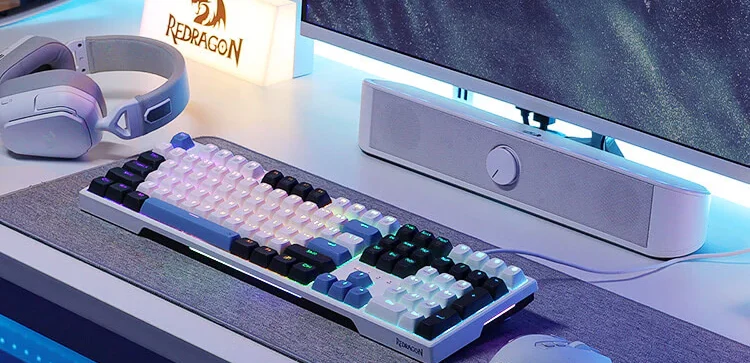
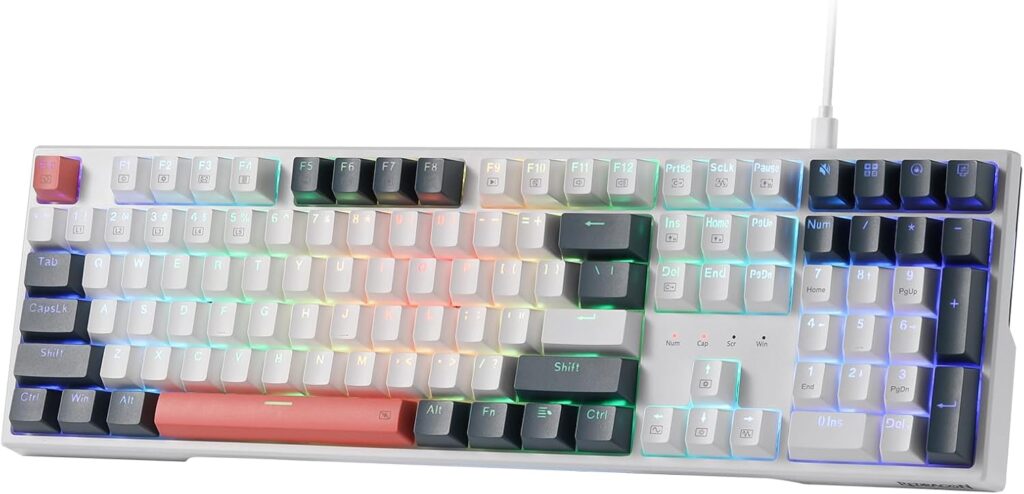
The Redragon K668 is the one I would point most people to when they want a full-size board and do not want to spend too much. It keeps things simple in a good way. You get a 108-key wired layout, four extra shortcut keys, RGB, and hot-swap support that works with both 3-pin and 5-pin switches according to the listing. Redragon also calls out sound-absorbing foam and includes two sets of keycaps, which is a nice touch at this level.
What I like here is that it does not pretend to be some ultra-premium enthusiast board. It is more of a practical entry point. If you want a keyboard for gaming, school, office work, and general daily use, this makes sense fast. Full-size boards still matter if you use a numpad, and a lot of people do not realize how annoying it is to lose that until they actually need it.
The main trade-off is that this is still a wired plastic board, and that is fine, but you should go in expecting value first, not boutique keyboard luxury. If you want a smaller layout, a knob, or wireless use, this is not that keyboard.
Why We Like It
It gives you the stuff most people actually need: a full-size layout, quiet-ish linear red switches, broad hot-swap compatibility, anti-ghosting, and a straightforward wired setup. It feels like a smart first buy for someone who wants to get into hot-swappable keyboards without turning it into a whole hobby.
Pros
- Full-size 108-key layout is better for work and gaming if you use a numpad
- Hot-swappable support for 3-pin and 5-pin switches gives you real upgrade room
- Red switches should feel smooth and easy for fast typing and gaming
- Sound-absorbing foam is a nice bonus for a cheaper board
- Extra shortcut keys and two sets of keycaps add value
Cons
- Wired only, so no Bluetooth or 2.4GHz flexibility
- Plastic build and budget positioning mean it is not the most premium-feeling option
- Takes up more desk space than compact 75% and 98-key boards
- Not the best fit if you want a knob or multi-device support
AULA F75 Pro Wireless Mechanical Keyboard
Tested by: Editorial feature review
Best for: People who want the sweet spot between compact size, gaming performance, and everyday comfort
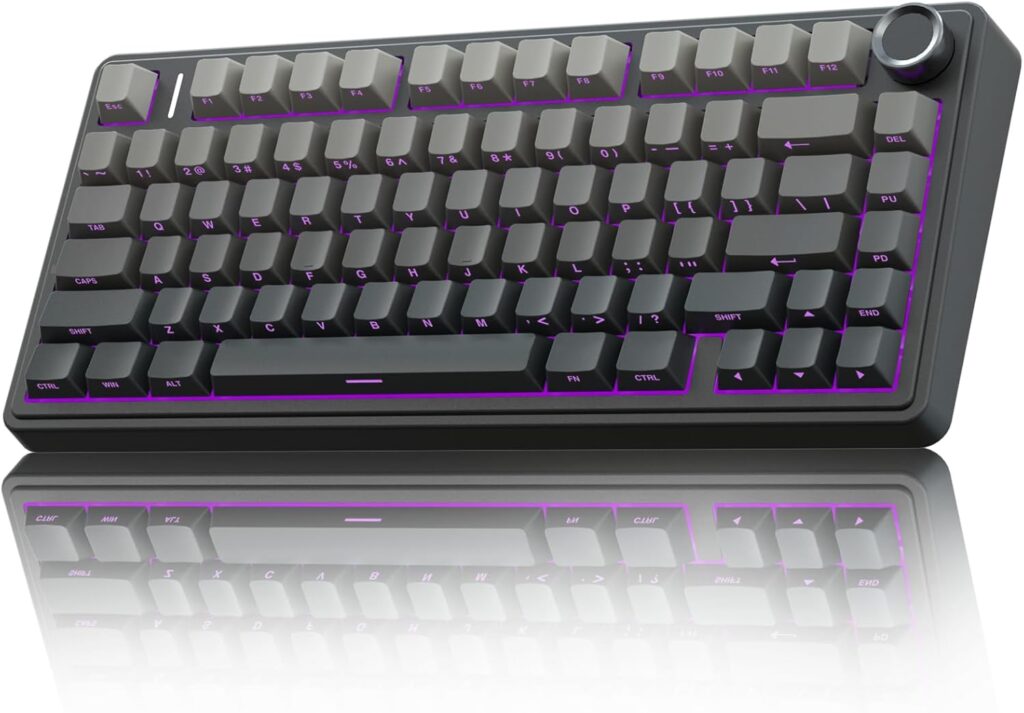
The AULA F75 Pro is the one in this list that feels easiest to recommend to the average buyer who wants a more modern keyboard without getting too deep into custom board territory. It is a 75% layout, which is one of the most practical layouts around. You save desk space, but you still keep arrow keys and the main controls people actually use. On top of that, it adds a knob, tri-mode connectivity, hot-swap support, and a 4000mAh battery. That is a very strong package.
AULA says this model supports Bluetooth 5.0, 2.4GHz wireless, and USB-C wired use, and can pair with up to five devices. It also supports 3-pin and 5-pin switch replacement, and comes with pre-lubed Reaper switches and pre-lubed stabilizers. On paper, that is exactly the kind of setup a lot of people want right now: smaller size, creamy-er sound profile, and no soldering headaches.
This is the one I would lean toward if you split your time between gaming and typing. It has a more enthusiast-style feature set than the Redragon, but it is still mainstream enough that you are not dealing with a weird layout or a learning curve. If there is one thing to keep in mind, it is that 75% is great for most people, but if you absolutely need a numpad every day, this will feel cramped.
Why We Like It
It balances almost everything well. The layout is compact without being annoying. The knob is useful. The tri-mode connectivity adds flexibility. The battery size looks solid for a board in this category. And the hot-swap support means you can keep evolving the feel later instead of being locked into one switch choice.
Pros
- Very practical 75% layout saves space without losing core keys
- Tri-mode connectivity gives you Bluetooth, 2.4GHz, and wired use
- 4000mAh battery is strong for a compact wireless keyboard
- Hot-swappable socket supports 3-pin and 5-pin switches
- Knob adds everyday convenience for volume or media control
- Pre-lubed switches and stabilizers should help with smoother out-of-box feel
Cons
- No numpad, which can be a dealbreaker for some work setups
- Compact layout may take a day or two to adjust to if you only use full-size boards
- Wireless features are great, but some users still prefer wired-only simplicity
- Side-printed PBT styling will not be everyone’s favorite look
wegear PIXIU 98 Mechanical Gaming Keyboard
Tested by: Editorial feature review
Best for: Buyers who want a near-full-size layout with stronger enthusiast-style features
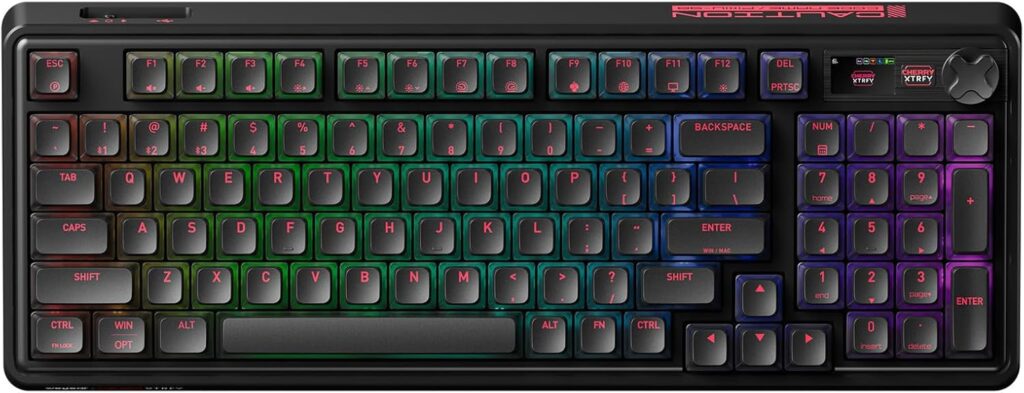
This is the most feature-heavy option in the group, and honestly, it is the one that reads the most like a premium-leaning pick. The wegear PIXIU 98 uses a 95-key compact layout, adds a knob, supports tri-mode connectivity, includes gasket mounting, PBT keycaps, and comes with CHERRY MX2A Brown switches. That already puts it in a more elevated category than your average starter keyboard.
What really makes it stand out is the feature stack. The listing claims 4000Hz wireless and 8000Hz wired polling, under 0.3ms latency, hot-swappability, a 4000mAh battery with up to 1100 hours in Bluetooth mode with lighting off, and support for multiple device types. That is the kind of spec set you normally look for when you want one keyboard to handle gaming, work, and desk aesthetics all at once.
I like that the layout stays compact while still giving you more keys than a 75% board. For people who feel a 75% is a bit too tight but a full-size is too wide, this kind of 98-style board often lands perfectly. The only real catch is that this is the priciest-feeling option here, so it makes the most sense if you will actually use the better switches, wireless options, and more advanced build features.
Why We Like It
It feels like the most complete package of the three. You get CHERRY MX2A switches, a more premium-style internal design, strong wireless and wired specs, a compact-but-capable layout, and a battery claim that is seriously competitive if you use Bluetooth with lighting off.
Pros
- 95-key layout is a smart middle ground between compact and full-size
- CHERRY MX2A Brown switches should appeal to people who like tactile feedback
- Tri-mode connectivity works for multi-device setups
- Gasket design and multi-layer padding suggest a softer, more refined typing feel
- PBT keycaps are a better long-term touch than cheaper ABS sets
- Fast polling specs are attractive for gaming-focused buyers
Cons
- This is the most premium-style option, so value shoppers may prefer the cheaper boards
- Brown switches are versatile, but not everyone likes tactile switches for gaming
- Feature-rich boards can be overkill if you only need a basic wired keyboard
- The original wegear URL you shared appears outdated, so this review uses the currently verifiable live product page instead
Other Things to Consider
Layout and desk space
This is one of the biggest things people get wrong. Full-size keyboards like the Redragon K668 are great if you use spreadsheets, work with numbers, or just like the familiar layout. But they eat desk space. Compact boards like the AULA F75 Pro feel much cleaner, especially if you game with low mouse sensitivity and want more room to move.
Wired vs wireless
If you hate charging anything, wired is still hard to beat. The Redragon keeps it simple. But if you switch between a PC, laptop, tablet, or even console setups, tri-mode wireless boards like the AULA F75 Pro and wegear PIXIU 98 are way more flexible.
Switch feel and noise
Linear red switches usually feel smoother and quieter, so they are easier to live with if you game late or share a room. Tactile brown switches give you more feedback, which some people love for typing. Pre-lubed switches and foam padding can make a huge difference to sound, even before you mod anything.
Battery life
Battery life matters only if you are actually going wireless. The AULA F75 Pro lists a 4000mAh battery, while the wegear PIXIU 98 also lists 4000mAh and claims up to 1100 hours in Bluetooth mode with lighting off. Real-life results always depend on RGB brightness, connection mode, and sleep settings, so take long battery claims as best-case numbers, not guaranteed daily reality.
Hot-swap compatibility
Not every hot-swap keyboard handles the same switch types equally well, so always check whether it supports 3-pin, 5-pin, or both. In this group, the Redragon and AULA listings explicitly call out both 3-pin and 5-pin support, which is a big plus for future upgrades.
Materials and extras
PBT keycaps usually wear better than ABS and feel better over time. Knobs can be surprisingly useful if you adjust volume a lot. Extra keycaps, included tools, and shortcut keys are all the little things that make a keyboard feel like a better buy.
Price and long-term value
A cheap hot-swappable keyboard can be the smarter buy if you just want to get started. But if you already know you want wireless, better switches, and a nicer build, spending more once can save you from upgrading again in a few months.
Frequently Asked Questions
What is a hot-swappable keyboard, and is it actually worth it?
A hot-swappable keyboard lets you remove and replace switches without soldering. That matters more than it sounds. If you buy a normal mechanical keyboard and later realize the switches are too loud, too stiff, or just not your style, you are pretty much stuck unless you want a complicated modding project. With a hot-swappable board, you can pull the switches out and change the feel later. For most people, that makes the keyboard more future-proof and easier to personalize, so yes, it is usually worth it.
Is a full-size keyboard better than a 75% or 98-key keyboard?
Not better for everyone, just better for certain habits. Full-size is best if you use a numpad often or want the most familiar layout possible. A 75% keyboard is better if you want more desk space and a cleaner setup without losing important keys like arrows. A 98-key or 95-key board sits in the middle and is great for people who want a more compact shape but still need more functionality than a 75% gives them. That is why the Redragon K668, AULA F75 Pro, and wegear PIXIU 98 all make sense for different buyers.
Are hot-swappable keyboards good for gaming?
Yes, absolutely. In fact, they can be better long term because you can tune the keyboard to your play style. Some gamers prefer smooth linear switches for quick repeated keystrokes. Others like tactile feedback for more control. A hot-swappable keyboard gives you options instead of locking you into one feel forever. Just remember that layout, latency, and connection type matter too. If you want simple reliability, wired is great. If you want flexibility and a cleaner desk, modern tri-mode wireless boards can work really well too.
Which switch type is best for beginners?
For most beginners, linear red switches are the safest starting point because they feel smooth, easy, and less fatiguing for a lot of users. They also tend to be a bit quieter than clicky options. Brown switches are another good beginner choice if you want noticeable feedback while typing without going full loud and clicky. There is no perfect universal answer, but if you are unsure, a hot-swappable keyboard makes the decision less stressful because you can always change later.
Do I need wireless on a keyboard, or is wired still better?
If your keyboard mostly stays on one desk and you care about simplicity, wired is still excellent. You never worry about charging, pairing, or battery drain. But wireless becomes very useful if you switch devices often, want a cleaner desk, or use the same keyboard for work and play across different systems. That is where boards like the AULA F75 Pro and wegear PIXIU 98 have a real advantage. Wired is not outdated at all. Wireless is just more convenient when your setup calls for it.
Conclusion
If you want the most affordable and straightforward full-size option, the Redragon K668 RGB Gaming Keyboard is the easiest recommendation. If you want the best balance of size, flexibility, and everyday value, the AULA F75 Pro Wireless Mechanical Keyboard is probably the smartest overall pick for most people. And if you want something that feels more feature-packed and premium-leaning, the wegear PIXIU 98 Mechanical Gaming Keyboard is the one I would look at first. The big thing is to match the keyboard to your setup: full-size if you need every key, 75% if you want a cleaner compact desk, and 98-key if you want a middle ground that does a bit of everything.