The Blue Yeti microphone review is worth a close look, with its four different pickup patterns, it adapts easily to various recording situations, ensuring clear sound whether for streaming or recording sessions.

Logitech Creators Blue Yeti USB
Best for: Ideal for podcasters and streamers
- Records crystal clear audio
- Versatile pickup patterns available
- Easy setup with plug and play
- A bit bulky for travel
- Slightly expensive for beginners
The standout aspect of the Blue Yeti is its ability to capture rich, clear audio owing to its three condenser capsules. Consequently, it offers four selectable pickup patterns, cardioid, omnidirectional, bidirectional, and stereo, making it flexible for various recording situations. However, for those who require absolute portability or want to avoid desktop clutter, its physical design might feel bulky.
Overall, it’s a solid choice for anyone serious about audio recording without diving into professional equipment territory.
| Best for | Podcasters and streamers |
| Not ideal for | Professionals needing ultra-portable gear |
| Standout feature | Versatile pickup patterns |
| Value | Premium |
| Bottom line | Highly recommended for quality audio recording. |
Things I like
- Multiple pickup patterns for various setups
- Plug-and-play functionality
- Solid build quality that feels robust
Things I’d improve
- Size can be cumbersome for travel
- Lacks some studio-level features
- Price point might not suit all budgets
Overview
| Brand | Logitech |
| Type | USB Microphone |
| Finish/Color | Black/Silver |
| Material | Metal and Plastic |
| Warranty | 2 years |
| Mounting/Format | Desktop Stand |
The Blue Yeti competes in the USB microphone market, primarily targeting casual and semi-professional users who value audio quality and versatility without the complexity of professional equipment.
Design & Build
| Finish | Black/Silver |
| Dimensions (H x W x D) | 11.6 x 4.7 x 4.6 in |
| Weight | 3.5 lbs |
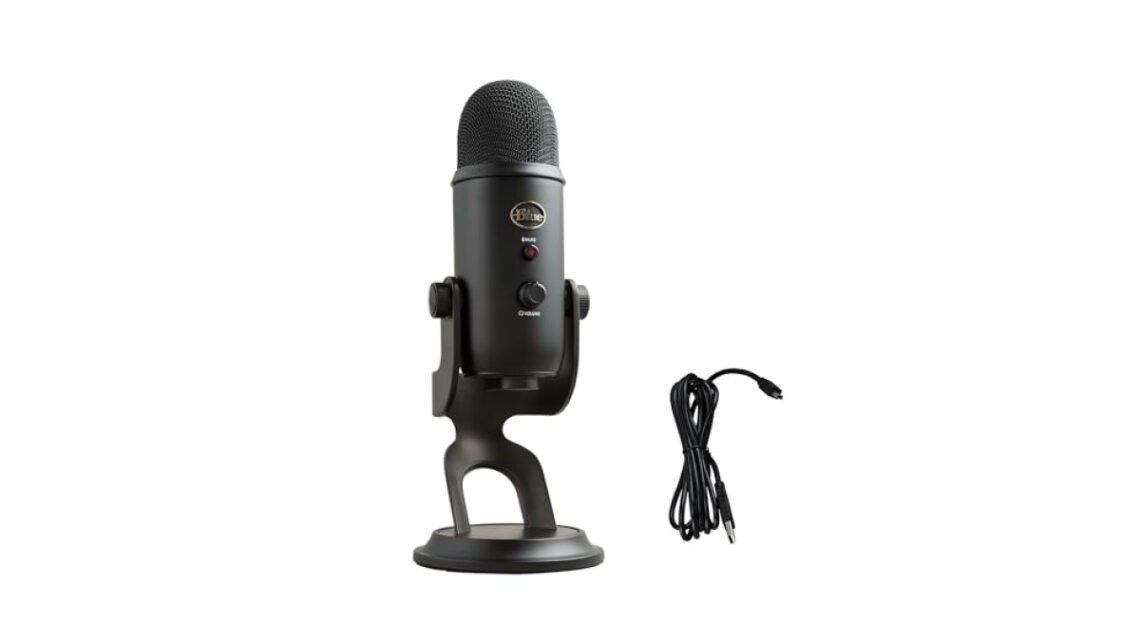
The Blue Yeti has a striking appearance that sets it apart from most microphones on the market. The robust metal construction not only enhances its aesthetic but also contributes to its durability. The microphone sits on a sturdy stand that gives it an authoritative presence on your desk, but the bulkiness means it’s not the best option if you operate in tighter spaces.
As for controls, the Blue Yeti is user-friendly, with knobs for gain control and a mute button conveniently placed on the front. This ease of access is crucial when you need to make quick adjustments without fumbling around mid-recording. That said, its larger size may not suit every gaming or streaming setup, especially those striving for minimalistic designs.
Performance
When testing the Blue Yeti, the audio quality is undeniably one of its major strengths. The microphone can record at a 24-bit/192kHz resolution, giving it the capacity to deliver intricate sound profiles ideal for gaming commentary or voiceovers. The ability to switch between the four pickup patterns means you’re equipped to handle different recording scenarios effectively.
The cardioid mode is excellent for isolating your voice, while the omnidirectional mode might be more fitting for group discussions or multi-person podcasts.
Most importantly, the Yeti performs exceptionally well across a range of environments, managing to capture clear sound even in less-than-ideal acoustics. Unlike some lower-end microphones, it minimizes background noise effectively, which is a game-changer for streamers trying to maintain a professional sound quality. Overall, the performance reflects its premium build, making it a reliable choice for those serious about their audio quality.
How It Handles Everyday Situations
- In a crowded streaming room, switching to the cardioid mode significantly reduces background noise, emphasizing your voice.
- For manual recordings on the go, the Blue Yeti fits well on a sturdy desk, but its weight makes it better suited for stationary use.
- During group podcast sessions, the bidirectional mode captures two speakers clearly from opposite ends of the table.
- In live gaming scenarios, the microphone’s mute button allows for quick adjustments without disturbing the flow of play.
Ease of Use & Installation
Setup for the Blue Yeti is straightforward; simply plug it into your USB port, and it’s ready to go, no additional drivers required. This plug-and-play design turns a potentially complicated installation into a hassle-free experience. Cleaning and maintenance are also minimal; a quick wipe of the grill and a dusting of the stand usually suffices.
- In the Box
- Blue Yeti Microphone
- Desktop Stand
- USB Cable
- User Manual
However, for those expecting more advanced features, the Blue Yeti does fall short in some areas. It lacks remote control or app integration, which might be crucial for users who want in-depth customization. Overall, it balances user-friendliness with solid performance, making it accessible to most users.
How It Compares
| Option | Best for | Key difference |
| Rode NT-USB | Professional use | Superior audio quality and additional filters |
| Audio-Technica AT2020USB+ | Budget options | Includes a built-in headphone jack for real-time monitoring |
Compared to its competitors, the Blue Yeti provides a well-rounded package, particularly for those who value versatility. While other mics might excel in specific aspects, the Yeti holds its ground with a solid blend of features, making it hard to beat in its price category.
Who Should Buy This
Great fit
- Podcasters seeking quality sound without professional gear
- Gamers wanting reliable audio for streaming
- Anyone needing versatile recording options
Look elsewhere if
- You need ultra-portable gear for travel
- You’re an audio professional looking for studio-grade specifics
- You prefer a microphone with extensive customization features
Final Verdict
For those prioritizing audio quality and flexibility, the Blue Yeti is the top recommendation. Budget-conscious users may consider the Audio-Technica ATR2100x, while those seeking portability might opt for the Rode NT-USB Mini.
Logitech Creators Blue Yeti USB
Best for: Ideal for podcasters and streamers
- Records crystal clear audio
- Versatile pickup patterns available
- Easy setup with plug and play
- A bit bulky for travel
- Slightly expensive for beginners
We cover microphone for streaming in more depth separately.
For more, read about under 200 for gamers.
Frequently Asked Questions
What makes the Blue Yeti microphone popular for gaming?
The Blue Yeti microphone is popular for gaming due to its exceptional sound quality and versatility, offering multiple pickup patterns that can be tailored for different gaming environments. Its USB connectivity makes it easy to set up and use with a wide range of devices.
How does the Blue Yeti compare to other USB microphones?
The Blue Yeti stands out among USB microphones for its robust build quality, advanced features, and superior audio clarity. It offers multiple polar patterns which allow for flexible recording options, making it a preferred choice for many users.
Can the Blue Yeti microphone be used for professional recording?
Yes, the Blue Yeti microphone can be used for professional recording, as it delivers high-quality sound that meets the needs of musicians and podcasters. Its versatility in polar patterns also enhances its suitability for various recording scenarios.
Is the Blue Yeti microphone compatible with all gaming systems?
The Blue Yeti microphone is compatible with most gaming systems that support USB audio devices. However, checking the specific system requirements prior to use is recommended to ensure compatibility.
Why do streamers prefer the Blue Yeti microphone?
Streamers prefer the Blue Yeti microphone for its excellent sound quality, ease of use, and multiple recording patterns that allow for optimal audio capture in a variety of streaming setups. Its professional aesthetic and reliable performance further enhance its appeal in the streaming community.