Selecting the right audio interface under $200 can elevate the audio quality of your streams or recordings significantly. After thorough analysis, there are five standout options that offer excellent audio fidelity and low latency, catering to needs ranging from gaming to music production.
When selecting an audio interface, you should focus on a few key features: sound quality, connectivity options (like the number of XLR inputs), and ease of use. Low latency audio is crucial for gamers and streamers who need to hear their voice and game sounds sync perfectly.
Additionally, portability can make a significant difference, especially if you plan to travel or set up your recording gear in different locations.
Featured in this article







1. FIFINE Ampligame SC3 Gaming Audio, Best for Streamers
The FIFINE Ampligame SC3 stands out for its excellent microphone control and built-in sound effects. The device features adjustable mic faders, making it easy to balance your voice against game audio in real-time. It’s also equipped with background noise reduction, which keeps your stream clean and professional.
Why we picked it: With its effective noise cancellation and fun sound effects, this USB audio interface enhances streaming experiences, especially for those starting their content creation journey.
Not ideal for: Experienced streamers might find the built-in effects limiting and may prefer a more customizable solution.
FIFINE Ampligame SC3 Gaming Audio
Best for: Aspiring streamers and podcasters
- Solid mic control with faders
- Built-in sound effects are fun
- Good background noise reduction
- Not suitable for USB mics
- Limited sound customization options
2. PUPGSIS Gaming Audio Mixer, Best for Creative Options
The PUPGSIS mixer is a great pick if you want to express your creativity while gaming. It comes with impressive noise cancellation capabilities and a built-in voice changer, providing a fun and interactive touch to your sessions. Custom sound effects add a layer of uniqueness to your streams.
Why we picked it: Its focus on noise management and diverse audio options makes it a standout for gamers looking to engage viewers with creative audio solutions that are also easy to manage.
Not ideal for: Users who require a high level of audio fidelity for music production may need to consider other models.
PUPGSIS Gaming Audio Mixer
Best for: Gamers wanting creative audio options
- Great noise cancellation features
- Fun voice changer included
- Custom sound effects are handy
- Requires a specific mic setup
- Bluetooth input only, limited use
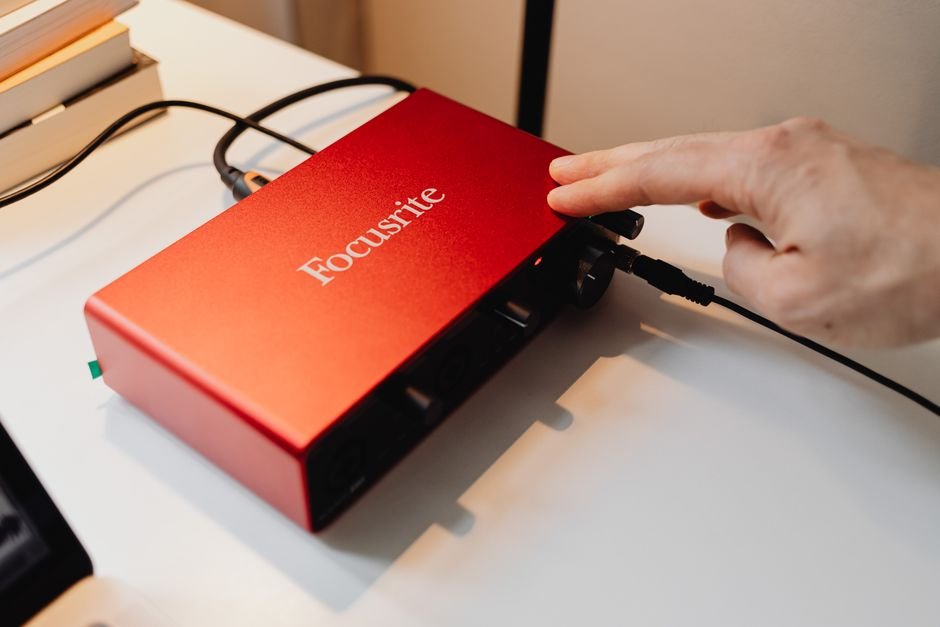
3. Focusrite Scarlett Solo 3rd Gen, Best for Quality
The Focusrite Scarlett Solo 3rd Gen is known for its exceptional preamps, providing clarity that shines through in both voice and instrument recordings. With its high-quality recording capabilities and bundled software, it’s particularly valuable for musicians and podcasters who demand sound fidelity.
Why we picked it: This model excels in delivering superior audio quality, which makes it an ideal choice for those serious about their recording clarity, especially compared to other competitors in this price bracket.
Not ideal for: If you’re primarily looking for gaming-specific features, this might feel overbuilt for your needs.
Focusrite Scarlett Solo 3rd Gen
Best for: Musicians and podcasters looking for quality
- Excellent pre-amps for clarity
- High-quality recording capabilities
- Comes with useful software tools
- Limited inputs for complex setups
- Might need additional cables
4. MAONO G3 Gaming Audio Mixer, Best for Organized Control
The MAONO G3 is designed for those who need to manage multiple audio sources seamlessly. It features four faders that allow for quick adjustments, which are especially helpful when you’re live-streaming or switching between different inputs. Its compact design is a bonus for small desk setups.
Why we picked it: Its ability to efficiently handle multiple sound sources and straightforward layout provides excellent control for dynamic gaming and streaming experiences.
Not ideal for: Beginners may find its array of features overwhelming if they’re not accustomed to mixing audio.
MAONO G3 Gaming Audio Mixer
Best for: Streamers needing organized audio control
- Four faders for quick adjustments
- Supports multiple audio sources easily
- Compact design fits desk setups
- Initial setup can be tricky
- Limited to Windows platforms only
5. M, Best for Mobile Creators
This portable audio interface is designed for creators on the go. It connects directly via USB and features high-quality preamps for clear sound. It’s lightweight, making it an easy addition to your mobile recording setup, and it doesn’t sacrifice performance for portability.
Why we picked it: The combination of portability and incredibly clear sound sets this device apart, especially for those who want to take their recordings anywhere.
Not ideal for: If you need multiple XLR inputs, this device won’t meet your requirements.
M
Best for: Mobile creators and musicians
- Portable design for easy transport
- Crystal clear sound with preamps
- USB for direct computer connection
- May require additional software setup
- Latency issues reported by some
6. PIYONE Audio Interface, Best for Home Studio Musicians
The PIYONE is an excellent choice for home studio setups, featuring a plug-and-play design that requires minimal configuration. With a sampling rate of 192kHz, it delivers impressive sound quality suited for both voice and instruments, ensuring professional outputs.
Why we picked it: Its ease of use combined with high-quality sound resolution makes it a fantastic entry-level interface for musicians who may be building their first studio.
Not ideal for: Advanced users might find its capabilities somewhat limited, especially with fewer advanced features.
PIYONE Audio Interface
Best for: Ideal for home studio musicians
- Plug-and-play setup is effortless
- Great sound quality at 192kHz
- Stylish design with LED controls
- Might feel a bit heavy
- Limited to two inputs only
7. Jolgoo 2×2 USB Audio Interface, Best for Budget Sound
The Jolgoo offers fantastic real-time monitoring, allowing you to hear your input directly without delays. High-quality audio capture ensures that your recordings remain clear and professional, while its durable metal construction adds to its longevity.
Why we picked it: It’s one of the best budget-friendly options that doesn’t skimp on essential features, making it a reliable choice for novice podcasters and musicians alike.
Not ideal for: This interface isn’t equipped for more complex setups requiring multiple inputs.
Jolgoo 2×2 USB Audio Interface
Best for: Perfect for podcasters and musicians
- Real-time monitoring is fantastic
- High-quality audio capture
- Durable metal construction
- Gain control could be better
- Some setup confusion initially
How to Choose the Right Audio Interface
When you’re overwhelmed by the range of options, focus on the critical aspects:
Evaluate Your Needs
Consider what you will use the audio interface for. Musicians might prioritize high-quality preamps, as seen in the Focusrite Scarlett Solo, while gamers may care more about built-in effects and sound stylization as in the FIFINE SC3.
Check Input Options
The number of XLR inputs is crucial based on your setup. If you’re streaming or recording solo, a single input like that of the M might suffice, but for bands or multiple sources, look at models like the MAONO G3 with multiple faders.
Consider Portability
If you’re a mobile creator, prioritize an interface like M that easily fits in your bag but still delivers great sound. If you want something stationary for a home studio, options like the PIYONE offer excellent quality and ease of setup.
Look at Software Compatibility
Ensure the audio interface works well with your existing software. Most of the models listed come with useful software packages, but checking compatibility can save you headaches down the line.
See also our take on gaming monitors.
Our write-up on best rated gaming picks up where this leaves off.
Frequently Asked Questions
What is the best audio interface for gaming under $200?
The best audio interface for gaming under $200 includes the FIFINE Ampligame SC3 Gaming Audio, PUPGSIS Gaming Audio Mixer, and Focusrite Scarlett Solo 3rd Gen. Each of these products is designed to enhance your gaming experience with quality sound and versatile features.
How do I choose an audio interface for gaming?
When choosing an audio interface for gaming, consider factors such as compatibility with your gaming setup, number of inputs and outputs, and sound quality. Products like the MAONO G3 Gaming Audio Mixer and PIYONE Audio Interface offer great options for various gaming needs.
Is a USB audio interface good for gaming?
Yes, a USB audio interface is good for gaming as it provides high-quality audio input and output, which can significantly enhance your gaming experience. Models like the Jolgoo 2×2 USB Audio Interface are designed to ensure seamless connectivity and superior sound quality.
Can an audio interface improve gaming sound quality?
Absolutely, an audio interface can improve gaming sound quality by providing clearer audio, better sound mixing, and more control over sound settings. Devices like the Focusrite Scarlett Solo 3rd Gen are particularly known for their sound clarity and reliability, making them ideal for gamers.
Why do streamers use audio interfaces?
Streamers use audio interfaces to achieve better sound quality, as these devices allow for professional-grade audio input and mixing capabilities. The FIFINE Ampligame SC3 Gaming Audio and PUPGSIS Gaming Audio Mixer are examples of interfaces that help streamers enhance their audio presentation.