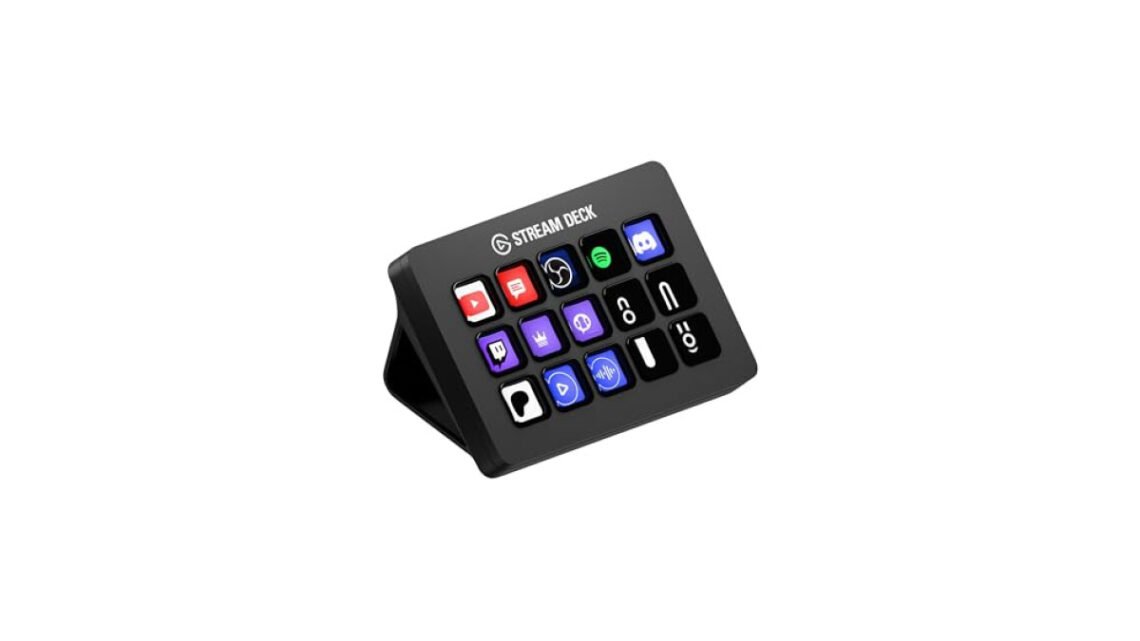
The Elgato Stream Deck review is worth a close look, this device allows you to manage your live streaming tools and workflows with greater efficiency. It's an essential asset for anyone serious about content creation.

Elgato Stream Deck MK.2 Studio
Best for: Ideal for streamers and content creators
- Easy to customize for workflows
- Single button can launch sequences
- Great integration with popular apps
- Takes time to set up
- Can feel bulky on desk
One standout feature of the Stream Deck MK.2 is its ability to launch complex sequences with a single button press. This functionality is particularly crucial when you need quick access to multiple commands without fumbling between applications. Its seamless integration with popular apps enhances usability, allowing you to customize settings easily.
However, for those who prefer simplicity or are just getting started, the learning curve might feel steep. Still, I firmly believe the benefits outweigh this initial hassle.
| Best for | Streamers and content creators seeking customization |
| Not ideal for | Casual users or those looking for basic functionality |
| Standout feature | Highly customizable buttons for complex commands |
| Value | Premium |
| Bottom line | A must-have for serious content creators aiming for efficiency. |
Things I like
- Intuitive software for easy configuration.
- Responsive buttons with bright LCD displays.
- Ability to create custom profiles for different applications.
Things I’d improve
- A more beginner-friendly tutorial would be helpful.
- Incorporating Bluetooth connectivity for wireless use.
- Increased button customization options, particularly for graphics.
Overview
| Brand | Elgato |
| Type | Streaming control device |
| Finish/Color | Black |
| Material | Plastic |
| Warranty | 2 years |
| Mounting/Format | Desktop |
The Elgato Stream Deck MK.2 competes in the niche of desktop streaming tools, tailored specifically for those involved in content creation and live broadcasting. Its primary aim is to enhance user control over complex workflows through customization and intuitive design.
Design & Build
| Finish | Matte black |
| Dimensions | 4.6 x 6.3 x 1.6 inches |
| Weight | 0.7 lbs |
| Button Count | 15 customizable keys |
The design of the Stream Deck MK.2 is straightforward yet elegant, with a compact form factor that fits nicely on any desk setup. The key feel is tactile, and the matte finish minimizes fingerprints and scratches, which is something I appreciate in a tool that sits front and center during my streams.
The customizable buttons feature bright LCD displays, allowing you to personalize both the icons and functionalities based on your needs. While the aesthetic is professional, I found that the construction does have its limits; I would caution against excess rough handling as the device is primarily plastic.
Performance
Performance-wise, the Elgato Stream Deck excels in creating shortcuts. The button responsiveness is impressive, and the ability to control multiple apps at once saves valuable time during a live stream. You can program the buttons for different streaming platforms or editing software, significantly enhancing your workflow efficiency. Every press is registered almost instantaneously, which is vital in high-pressure broadcasting environments where timing is everything.
| Key Features | Details |
| Customization | 15 programmable keys for quick actions |
| Integration | Compatible with major streaming software |
| App control | Single-button macros for complex commands |
How It Handles Everyday Situations
- For professional streamers, the ability to trigger scenes and sources while live is invaluable.
- If you’re running a podcast, the button sequencing can make soundboard effects immediate and straightforward.
- In content creation, switching between editing software during a workflow saves on time dramatically.
- For gamers, launching overlays or starting recordings becomes effortless with this compact solution.
Ease of Use & Installation
Setting up the Elgato Stream Deck MK.2 is mostly hassle-free, thanks to an intuitive companion application that walks you through the initial configuration steps. The software offers a plethora of options for button assignments and macros. One potential friction point, however, involves the depth of customization; some users might find themselves overwhelmed by the options available.
The included setup guide provides just enough direction, but additional tutorials would make it easier for less tech-savvy users. It’s essential to spend a bit of time exploring the software to maximize its capabilities.
In the box, you will find:
- Elgato Stream Deck MK.2
- Stand
- USB cable
- Quick start guide
How It Compares
| Option | Best for | Key difference |
| Razer Stream Controller | Gamers seeking advanced features | More expensive with advanced haptic feedback |
| XSplit VCam | Basic streamers | More budget-friendly but less customizable |
Among alternatives, the Elgato Stream Deck MK.2 stands out for its seamless integration with various streaming platforms. While others in the category have their strengths, none offer the same level of button customization and ease of use that the Stream Deck does.
Who Should Buy This
Great fit
- Content creators who need quick access to complex commands
- Streamers looking to manage multiple sources effortlessly
- Professionals who want a polished interface for presentations
Look elsewhere if
- You are a casual user not seeking advanced functionality
- Your main focus is budget over features
- You prefer traditional keyboard setups without customization
Final Verdict
For streamers and content creators looking to enhance their workflows, the Elgato Stream Deck MK.2 is the clear choice. If you're on a tighter budget, consider alternatives like the Loupedeck Live, which caters to those who need fewer features without sacrificing functionality. Each option serves a specific audience, ensuring that you'll find a tool that fits your needs.
Elgato Stream Deck MK.2 Studio
Best for: Ideal for streamers and content creators
- Easy to customize for workflows
- Single button can launch sequences
- Great integration with popular apps
- Takes time to set up
- Can feel bulky on desk
Our write-up on microphone for streaming picks up where this leaves off.
Frequently Asked Questions
What makes the Elgato Stream Deck MK.2 unique?
The Elgato Stream Deck MK.2 is unique due to its customizable LCD keys, which allow users to program a wide range of commands and macros for various applications. Its compact design and modular functionality make it an essential tool for streamers and content creators, enhancing productivity and workflow.
How to customize Elgato Stream Deck MK.2?
Customizing the Elgato Stream Deck MK.2 is straightforward; users can drag and drop actions from the Stream Deck software onto the keys. The software also allows you to assign icons, change key functions, and create folders for organizing similar commands.
Is the Elgato Stream Deck MK.2 suitable for beginners?
Yes, the Elgato Stream Deck MK.2 is suitable for beginners thanks to its intuitive setup and user-friendly interface. Even those new to streaming or content creation can quickly learn to customize and utilize its features for various tasks.
Can the Stream Deck MK.2 be used for video editing?
Absolutely, the Stream Deck MK.2 can be effectively used for video editing by assigning shortcuts for editing software functions like cutting, fading, and applying effects. This saves time and streamlines the editing process, allowing for greater efficiency.
Why choose Elgato over other stream decks?
Choosing Elgato over other stream decks often comes down to its robust software integration and user-friendly design. The Elgato Stream Deck MK.2 is specifically tailored for streamers and creators, providing a seamless experience with extensive customization options.