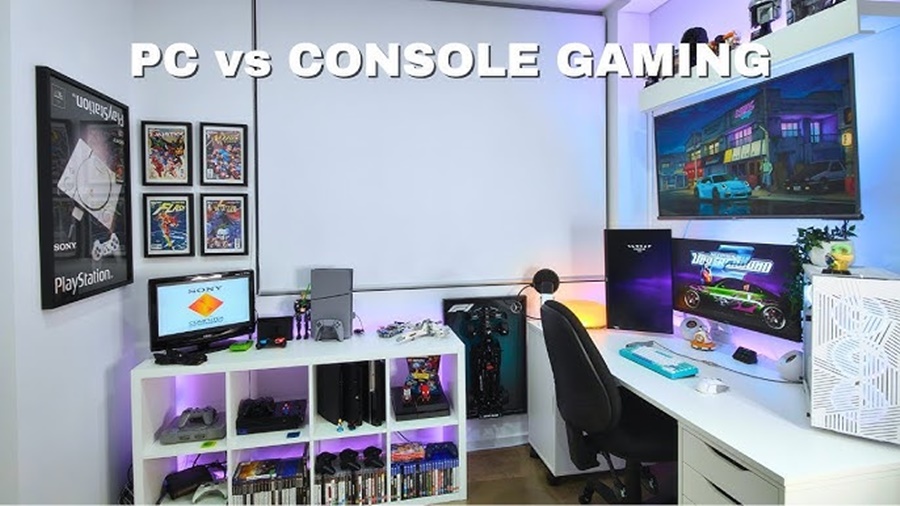
Gaming has evolved into one of the biggest entertainment industries in the world, and players now have more choices than ever before. Among the most common debates in gaming culture is whether a PC gaming setup or a console gaming setup offers the better experience. Both platforms have loyal communities, powerful hardware, and unique advantages. However, the right choice depends on budget, gaming style, performance expectations, and personal preferences.
This article explores the differences between PC gaming setups and console gaming setups in detail, covering performance, cost, customization, game libraries, online services, portability, and overall user experience.
Understanding PC Gaming Setups
A PC gaming setup usually includes a gaming desktop or laptop along with peripherals such as a monitor, keyboard, mouse, headset, and sometimes specialized accessories like mechanical keyboards or gaming chairs.
Gaming PCs are designed to deliver high performance through customizable hardware components such as:
- Graphics cards (GPU)
- Processors (CPU)
- RAM
- SSD storage
- Cooling systems
One of the major strengths of PC gaming is flexibility. Players can build their systems according to their performance needs and budget.
Understanding Console Gaming Setups
Console gaming setups revolve around dedicated gaming systems such as:
- PlayStation
- Xbox
- Nintendo Switch
Consoles are designed specifically for gaming and are optimized to provide a smooth and simple user experience. A typical console setup includes:
- The console itself
- A TV or monitor
- Controllers
- Optional accessories like headsets or charging docks
Consoles are generally easier to use because they are plug-and-play devices that require minimal technical knowledge.
Performance Comparison
PC Gaming Performance
Gaming PCs are widely known for superior graphical performance and higher frame rates. High-end gaming PCs can support:
- 4K gaming
- Ultra graphics settings
- Ray tracing
- 120Hz to 240Hz refresh rates
- Faster loading times
PC gamers can also upgrade components over time to keep up with new technology.
Advantages include:
- Better graphics quality
- Higher FPS (frames per second)
- Superior multitasking
- Better support for ultra-wide monitors
- More precise controls using keyboard and mouse
However, achieving top-tier performance often requires expensive hardware.
Console Gaming Performance
Modern consoles have become extremely powerful. Devices like the latest PlayStation and Xbox systems support:
- 4K gaming
- HDR visuals
- Ray tracing
- Smooth gameplay optimization
Consoles are optimized for games developed specifically for their hardware. This means developers can fine-tune performance without worrying about different hardware combinations.
Advantages include:
- Stable performance
- Consistent optimization
- Easy setup
- Lower hardware complexity
The downside is limited upgrade options. Once a console becomes outdated, users typically need to purchase the next generation.
Cost Comparison
Initial Cost of PC Gaming
A gaming PC setup can be expensive, especially if aiming for high-end performance. Costs may include:
- Gaming PC
- Monitor
- Keyboard and mouse
- Gaming headset
- Accessories
Entry-level gaming PCs may be affordable, but powerful systems can cost significantly more than consoles.
However, PCs also serve multiple purposes such as:
- Work
- Video editing
- Streaming
- Programming
- Content creation
This makes them more versatile overall.
Initial Cost of Console Gaming
Consoles are usually cheaper upfront. Most gaming consoles come ready to use right out of the box.
Additional expenses may include:
- Extra controllers
- Subscription services
- Storage expansion
- Online multiplayer memberships
Despite these costs, consoles remain the more budget-friendly option for casual gamers.
Game Library and Exclusives
PC Game Library
PC gaming has one of the largest game libraries available. Players can access:
- AAA titles
- Indie games
- Strategy games
- Simulation games
- Mods and custom content
Digital storefronts frequently offer discounts, making PC gaming attractive for players who buy many games.
PC also supports backward compatibility more effectively than most consoles.
Console Exclusives
Consoles are famous for exclusive titles that are unavailable on other platforms. These exclusives often become system sellers because of their quality and popularity.
Examples include:
- Story-driven adventures
- Platform exclusives
- Sports franchises
- Family-friendly games
Console exclusives can strongly influence a player’s platform choice.
Customization and Upgradability
PC Customization
One of the biggest strengths of PC gaming is customization.
Players can:
- Upgrade graphics cards
- Add more RAM
- Improve cooling
- Customize RGB lighting
- Change cases and aesthetics
- Use mods for games
This level of personalization appeals to enthusiasts who enjoy tweaking performance and appearance.
Console Simplicity
Consoles focus on simplicity rather than customization.
Benefits include:
- Minimal maintenance
- No driver installations
- No hardware compatibility issues
- Easy software updates
For users who simply want to play games without technical adjustments, consoles are highly convenient.
Controls and User Experience
PC Controls
PC gaming supports:
- Keyboard and mouse
- Controllers
- Flight sticks
- Racing wheels
- VR accessories
Keyboard and mouse setups are especially popular in competitive genres such as:
- First-person shooters
- Real-time strategy games
- MOBAs
Precision and responsiveness are major advantages.
Console Controls
Consoles are designed around controllers, offering a comfortable couch gaming experience.
Advantages include:
- Relaxed gameplay
- Split-screen multiplayer
- Easy navigation
- Comfortable long gaming sessions
Console gaming is often more social and family-friendly in living room settings.
Online Gaming and Services
PC Online Gaming
PC platforms offer flexible online experiences. Some online multiplayer games are free, while others may require subscriptions through certain services.
Benefits include:
- Dedicated servers
- Modding communities
- Voice chat applications
- Competitive esports environments
PC gaming also supports extensive streaming and content creation tools.
Console Online Services
Consoles often require paid subscriptions for online multiplayer access.
These services usually include:
- Monthly free games
- Cloud saves
- Multiplayer support
- Discounts
Console ecosystems are designed to create smooth and unified online experiences.
Portability and Space Requirements
Gaming PCs
Desktop gaming setups require dedicated space and are less portable.
Gaming laptops improve portability but may sacrifice:
- Cooling efficiency
- Battery life
- Upgrade potential
A full PC setup may also involve cable management and larger desk space.
Consoles
Consoles are compact and easy to move between rooms or locations.
Advantages include:
- Smaller footprint
- Living room compatibility
- Easier transportation
- Simple TV connection
This makes consoles ideal for shared households and casual gaming environments.
VR and Advanced Technologies
PC gaming currently leads in advanced technologies such as:
- High-end virtual reality
- Ultra-wide monitor support
- Advanced graphics settings
- Professional streaming setups
Consoles also support VR and modern graphical features, but usually with more hardware limitations.
Maintenance and Technical Knowledge
PC Maintenance
Gaming PCs require occasional maintenance, including:
- Driver updates
- Hardware troubleshooting
- Dust cleaning
- System optimization
Some users enjoy the technical side of PC ownership, while others may find it frustrating.
Console Maintenance
Consoles require very little maintenance.
Most updates are automatic, and users rarely deal with hardware compatibility problems. This simplicity is one of the main reasons consoles remain popular worldwide.
Which Setup Is Better for Different Gamers?
Choose a PC Gaming Setup If You:
- Want maximum performance
- Enjoy customization
- Play competitive games
- Need a multipurpose device
- Prefer modding and upgrades
- Use streaming or content creation tools
Choose a Console Gaming Setup If You:
- Want affordable gaming
- Prefer simplicity
- Enjoy couch gaming
- Like exclusive titles
- Do not want technical maintenance
- Prefer plug-and-play convenience
Conclusion
The debate between PC gaming setups and console gaming setups has no universal winner because both platforms serve different types of gamers.
PC gaming offers unmatched performance, customization, and flexibility. It is ideal for enthusiasts, competitive gamers, and users who want full control over their hardware and software experience.
Console gaming, on the other hand, delivers affordability, simplicity, and convenience. It is perfect for casual gamers, families, and players who want an easy and reliable gaming experience without dealing with technical complexity.
Ultimately, the best gaming setup depends on personal preferences, budget, and gaming goals. Some gamers even choose both platforms to enjoy the advantages each one offers.