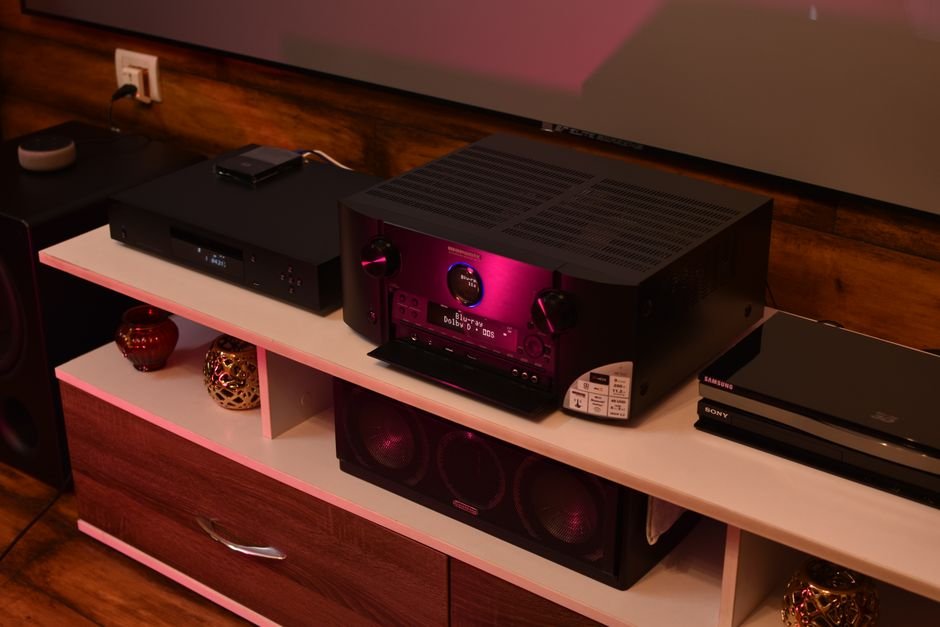
A quality AV receiver typically ranges from $300 to over $1,500, making it a significant investment in your home theater setup. To ensure you preserve your surround sound experience while enhancing your components, it's essential to approach this replacement with a clear plan in mind.
In my experience, the key to a smooth transition includes not only the correct equipment but also a solid understanding of your current setup. Taking the time for proper installation will result in better sound quality and an all-around better viewing experience. You wouldn’t want to plug everything in haphazardly and end up with subpar sound, right?

Preparing for AV Receiver Replacement
Before diving into the replacement process, I focused on gathering the necessary tools and identifying my existing connections. First, you need to assess what you’re replacing. Is your current receiver outdated or malfunctioning? Make a list of the features you want, for example, how many HDMI inputs do you need?
Most modern receivers offer around six to eight ports, perfect for streaming devices, gaming consoles, and Blu-ray players.
Secondly, ensure you have quality audio cables ready. I recommend speaker wire rated for at least 16-gauge for most home setups. Also, be sure to have your splicing or banana plugs to secure those connections tightly. Don’t forget about settings that may require recalibration, such as the automatic speaker calibration features many new models offer.
Steps to Safely Remove Your Old Receiver
Removing the old receiver can seem daunting but just take it step by step. First, ensure everything is unplugged and disconnected. I like to take a picture of the back of my current receiver to remember where everything was connected. Then, carefully unplug all audio and video cables, and label them if you’re not certain which device they belong to.
This helps avoid confusion when you go to connect your new receiver.
Next, once you’ve cleared the space, I recommend cleaning it out before you place your new unit in. Dust can build up in these areas and potentially affect your sound quality over time. With a clean slate and all cables disconnected, it’s time for the new AV receiver.

Connecting and Setting Up the New Receiver
Connecting your new AV receiver is where the fun begins. I usually start with the speakers, connecting each cable to the corresponding terminal. It’s critical to pay attention to the positive and negative labels; miswiring can lead to poor sound quality or even damage to your equipment. Then, move on to the HDMI inputs.
Make sure your sources are connected to the correct input ports, many receivers allow you to reroute HDMI inputs into specific audio settings.
Once everything is plugged in, it’s time to fire up your new receiver. Follow the on-screen setup guide, which typically walks you through various settings like speaker configuration and network connectivity. If your receiver supports automatic speaker calibration, I highly recommend using that. It analyzes your room’s acoustics and adjusts the settings accordingly.
This small step can make a significant difference in how the sound fills your space.
Troubleshooting Common Issues After Replacement
Even the best setups can run into issues after replacing an AV receiver, so it’s wise to be prepared. If sounds aren’t coming through, start by double-checking the connections. Make sure cables are firmly seated in their ports and haven’t come loose during installation.
If your surround sound is missing, you might need to revisit the speaker configuration settings on your receiver to ensure all channels are correctly assigned and calibrated.
Occasionally, you might experience lip-sync issues, particularly when using a streaming source. Make sure you check for firmware updates on your new receiver, as manufacturers often release fixes and enhancements. Lastly, ensure that your TV and AV receiver are set to the same audio format, otherwise, you might find yourself stuck with suboptimal sound.
Worth reading alongside this: mixer setup.
Final Thoughts on Upgrading Your AV Receiver
Consider the Denon AVR-X3700H for a well-rounded option that caters to both casual viewers and audiophiles alike. For those needing a more budget-friendly alternative, the Yamaha RX-V385 delivers solid performance without breaking the bank. Each choice will significantly enhance your sound quality and elevate your movie nights.
Frequently Asked Questions
How do you replace an AV receiver in a home theater?
To replace an AV receiver, begin by disconnecting all cables from your old receiver, including power, speakers, and any input devices. Next, connect your new AV receiver to the same cables, ensuring proper connections for speakers and source devices, then power on the new receiver and reconfigure your settings.
What equipment is needed to swap an AV receiver?
You'll need the new AV receiver, speaker wire (if you're changing configurations), and HDMI or audio/video cables for your devices. A screwdriver may also be helpful for securing connections, and a standard power outlet nearby is necessary for turning on the new receiver.
Why is my AV receiver not connecting to speakers?
If your AV receiver is not connecting to speakers, check that all speaker wires are securely connected to both the receiver and the speakers. Also, ensure that the receiver is set to the correct speaker configuration and that any input settings are appropriately configured.
Can I use any receiver for my gaming setup?
Not every receiver is ideal for gaming; look for a model that supports low latency and has sufficient HDMI inputs for your console and additional devices. Additionally, features such as 4K passthrough and high dynamic range (HDR) support can enhance your gaming experience.
Is professional installation necessary for AV receivers?
Professional installation is not strictly necessary, but it can be beneficial, especially for complex setups or if you're unsure about making the right connections. If you are comfortable with audio equipment and follow guidelines, a DIY installation is certainly feasible.